
Building an online TTRPG toolkit - Part 1: Campaign record-keeping and development
 Stephen Collins
This year, I've started back playing TTRPGs after many years away from the pastime. It's taken a few of months to ramp up and relearn some things, all the while absorbing as much as I can from a profoundly changed landscape.
Last I played with any regularity, Dungeons & Dragons, 2nd Edition was the current thing. There was no online play. There were no TTRPG influencers (some of whom are very interesting, and some of whom are clearly grifters). Blogging wasn't a thing; and there are so many TTRPG blogs. There were definitely no pro or semi-pro GMs. Things like actual play and organised play definitely didn't exist.
If you wanted to play a TTRPG of any sort, you played in your dining room (or a friend's), at the library, at school or uni, and at the one or two local cons that were available to you each year. Any time I can, that would be my preferred way to play, but living where I do, it's definitely a challenge.
Anyway, all this is to say it's all changed. My new group is exclusively online, as we're geographically dispersed, not least because I live 25km from the nearest rural town and can't identify a gaming culture for adults there (I'm still looking).
Finding and building a tool stack for online play has been a little experimental over recent weeks, but after our first session, played last Friday evening, I think we have something workable. I figured I'd detail it in a series of easily-consumed posts each day this week—one tool at a time—as that makes thinking about it in a structured way and documenting it tangible. That's going to be useful for future me, and others in a similar situation might also find it useful.
The choices here are pretty well known, so nothing I'm saying here should be groundbreaking. You could certainly do all of this with any chat tool or even email. You could also do it with a great deal more finesse using some of the high-end commercial campaign admin tools and other products out there. I've tried to do as much as I can at zero or near-zero cost, so that it's accessible both to me and anyone else who wants to try it.
Let's begin.
Like I said, free. Many of the specialist campaign management tools like World Anvil cost good money, and are certainly worth it if you want to make that investment; don't let me stop you. They are very good!
However, I personally think you can do a very serviceable job with Obsidian. One of the key benefits of Obsidian, and one that should be noted early, is that everything is stored in plain text using Markdown for formatting. This means that the files you build can always be picked up and moved to somewhere else for storage, or even into another Markdown-friendly tool like Notion (though they have unfortunately gone all-in on AI, so 🤮, caveat emptor).
The information I keep there covers campaign management, homebrew content, the drafts for posts on this blog, input and information from other people who play TTRPGs, various SRDs, game systems, and books in Markdown format. Much of the content I prepare for gaming begins in Obsidian before it gets shared to Discord or other tools like D&D Beyond or West Marches. For my preparation and record keeping, Obsidian is the single source of truth.
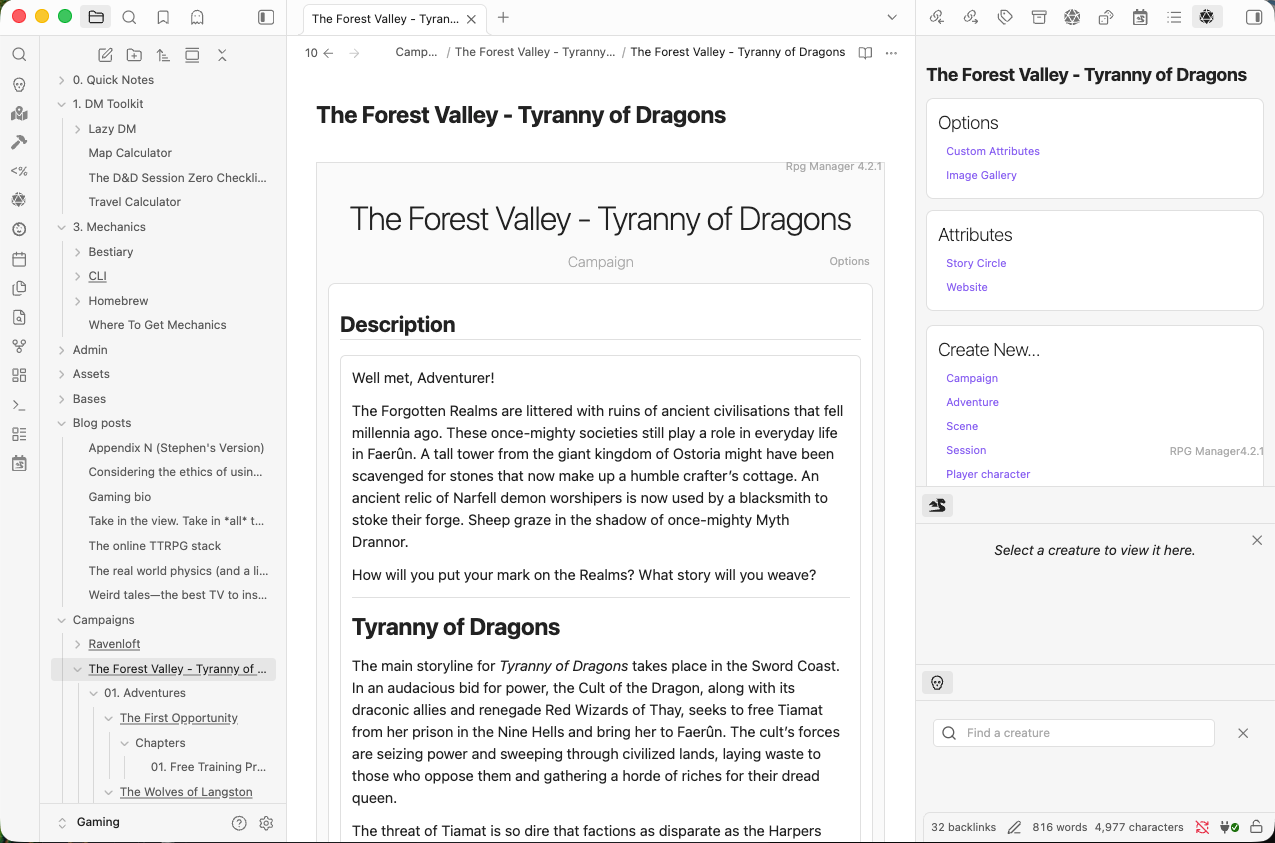
There is a rich community of creators providing excellent information on managing your TTRPG obsession with Obsidian, and I've borrowed ideas from many of them including PhD20, Solo RPG Studio, and Obsidian TTRPG Tutorials. They have spent a lot of effort richly documenting their approach; you should look at those places to see if their approach suits you.
I've settled on a structure for my Obsidian vault cribbed from several sources, and run everything for game management and writing using the outstanding RPG Manager plugin. This drives the engine of my game organisation and documentation. It should be noted that the plugin is doing some clever and complicated things under the hood, and it is possible to break your notes if you move or rename things without a plan to fix that across a few layers of content. It's not hard to fix if you break it, and a lot of it is automated by RPG Manager, but it can require some manual repair. I've spent a bit of time trying to understand RPG Manager under the hood, so I feel I have a good handle on what it's doing and can fix things pretty easily now.
On the matter of plugins, there's an extensive ecosystem of TTRPG-related plugins for Obsidian at their community website. For convenience and additional functionality, I run several Obsidian plugins:
- Calendarium - Create flexible fantasy and sci‑fi calendars for worldbuilding and fiction. Apply custom time systems across your vault to track dates and timelines consistently.
- Dice Roller - Roll inline dice expressions inside notes using dice: code blocks and display clickable results that re-roll on click.
- Fantasy Statblocks - Create, manage and view a Fantasy Bestiary in Obsidian with structured statblocks for tabletop RPGs. Store statblocks as Markdown for local, searchable, and linkable notes, with layouts for D&D 5e, Pathfinder 2e, 13th Age and other systems.
- Folder Notes - Attach notes to folders and open them by clicking a folder name, mirroring Notion-style folder pages.
- Image Converter - Convert pasted or dropped images to WEBP, JPG, or PNG and compress them by quality. Resize images destructively or non-destructively, auto-apply dimensions to image links, and annotate, crop, rotate, or flip images inline.
- Initiative Tracker - Track initiative and turn order for tabletop RPG combat. Add creatures or NPCs by name, dice roll, or bestiary entry; manage HP, AC and status, group duplicates, calculate XP, sort by initiative, and run multiple encounters in a single code block.
- Meta Bind - Create interactive inline input fields, view fields, and buttons inside your notes. Bind those fields to frontmatter properties to edit and display metadata in-place and keep note content and frontmatter synchronized.
- Omnisearch - Search your vault instantly with a BM25-ranked engine that prioritizes matches in filenames, headings, and content to surface the most relevant results.
- Pane Relief - Manage tabs and groups with browser-style navigation and persistent per-tab history that survives restarts, plus commands to move, switch, and rearrange tabs and windows.
- Plugin Update Tracker - Track available plugin updates and show status in the status bar or mobile ribbon. View a list of updates, read release notes rendered as Markdown, inspect code diffs and version stats, install or ignore updates, and opt into beta releases.
- Pretty Properties - Make metadata blocks more visually appealing with cover images, banners, icons, and color accents. Add covers, banners, or icons from local files, external links, or icon names, customize shapes and sizes, and hide properties to keep notes tidy.
- Settings Search - Add global search to Obsidian settings to quickly find and jump to specific options.
- Style Settings - Display all theme, snippet, and plugin CSS settings in a single settings pane.
- Tag Wrangler - Manage tags from the Tags view and notes using a context menu to open or create tag pages, run or refine searches, and add or exclude tags from searches.
- TTRPG Tools - Maps - Embed zoomable, interactive images as maps in notes and place markers, stickers, drawings, measurements, HUD pins and editable text layers atop them. Edit marker layers with icons, links and tooltips, switch base images and overlays, draw shapes, and measure calibrated distances with units and travel-time presets.
So, that's my Obsidian setup and how I use it. Tomorrow, I'll look at communicating and coordinating with your online group.


Comments